Objective
Enable client devices on one VLAN segment to obtain dynamic IP addresses from a DHCP server located on a completely different VLAN segment by configuring the ip helper-address DHCP relay agent command.
Lab Topology
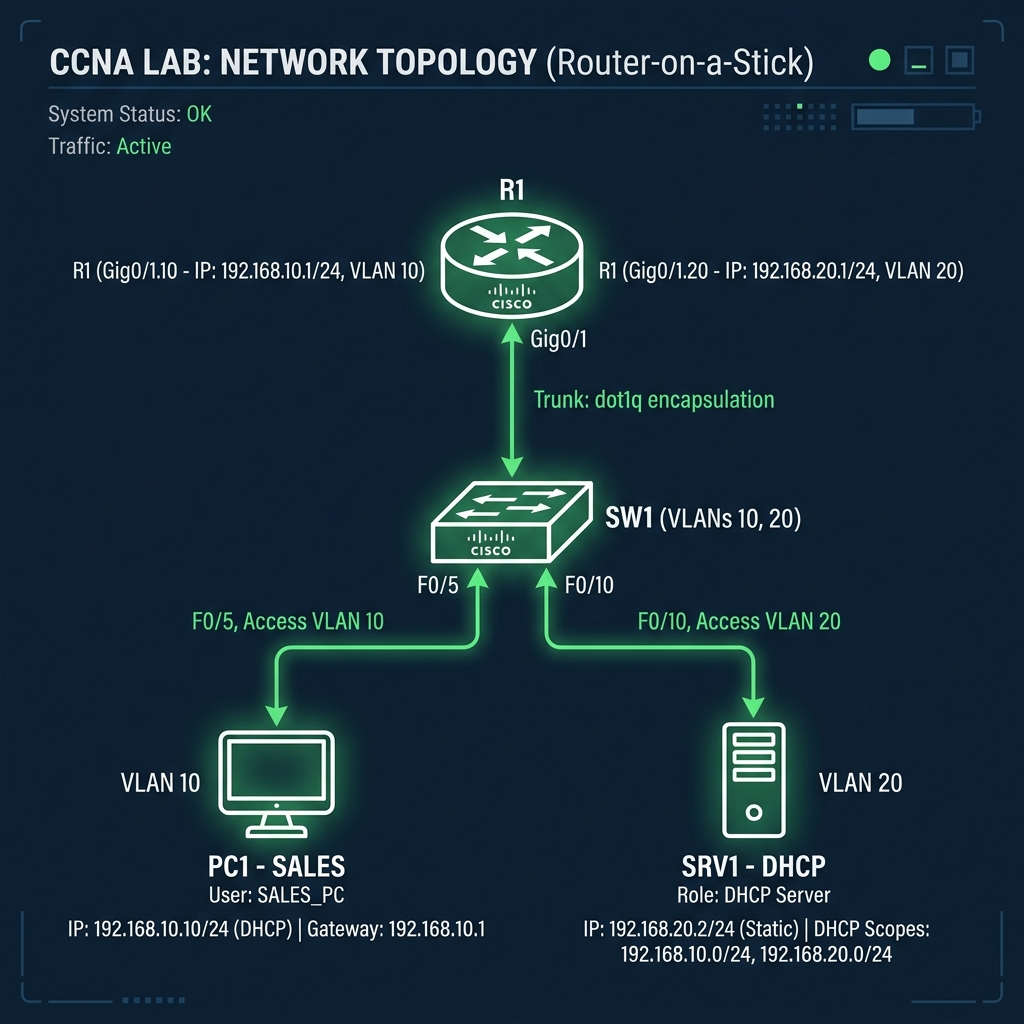
Task 1 - Configure Router Subinterfaces (R1)
Set up subinterfaces on interface GigabitEthernet0/0 using 802.1Q encapsulation for VLAN 10 (Client LAN) and VLAN 20 (Server LAN).
R1(config)# interface gigabitEthernet 0/0.10
R1(config-subif)# encapsulation dot1Q 10
R1(config-subif)# ip address 192.168.10.1 255.255.255.0
R1(config)# interface gigabitEthernet 0/0.20
R1(config-subif)# encapsulation dot1Q 20
R1(config-subif)# ip address 192.168.20.1 255.255.255.0
Task 2 - Configure DHCP Helper Address
Configure the ip helper-address command under subinterface Gi0/0.10 pointing to the DHCP Server's IP address (192.168.20.10) to forward local broadcasts as unicast packets.
R1(config)# interface gigabitEthernet 0/0.10
R1(config-subif)# ip helper-address 192.168.20.10
Task 3 - Configure Switch Trunk and Access Ports
Configure SW1's interface GigabitEthernet0/1 connected to the router as a Trunk port, and assign access ports to VLAN 10 and VLAN 20.
SW1(config)# interface gigabitEthernet 0/1
SW1(config-if)# switchport mode trunk
SW1(config-if)# exit
SW1(config)# interface range fastEthernet 0/1 - 10
SW1(config-if-range)# switchport access vlan 10
SW1(config-if-range)# exit
SW1(config)# interface range fastEthernet 0/11 - 20
SW1(config-if-range)# switchport access vlan 20