Objective
Synchronize Cisco IOS device system clocks with an external Network Time Protocol (NTP) server and configure centralized log forwarding to a remote Syslog server with custom logging trap severity levels.
Lab Topology
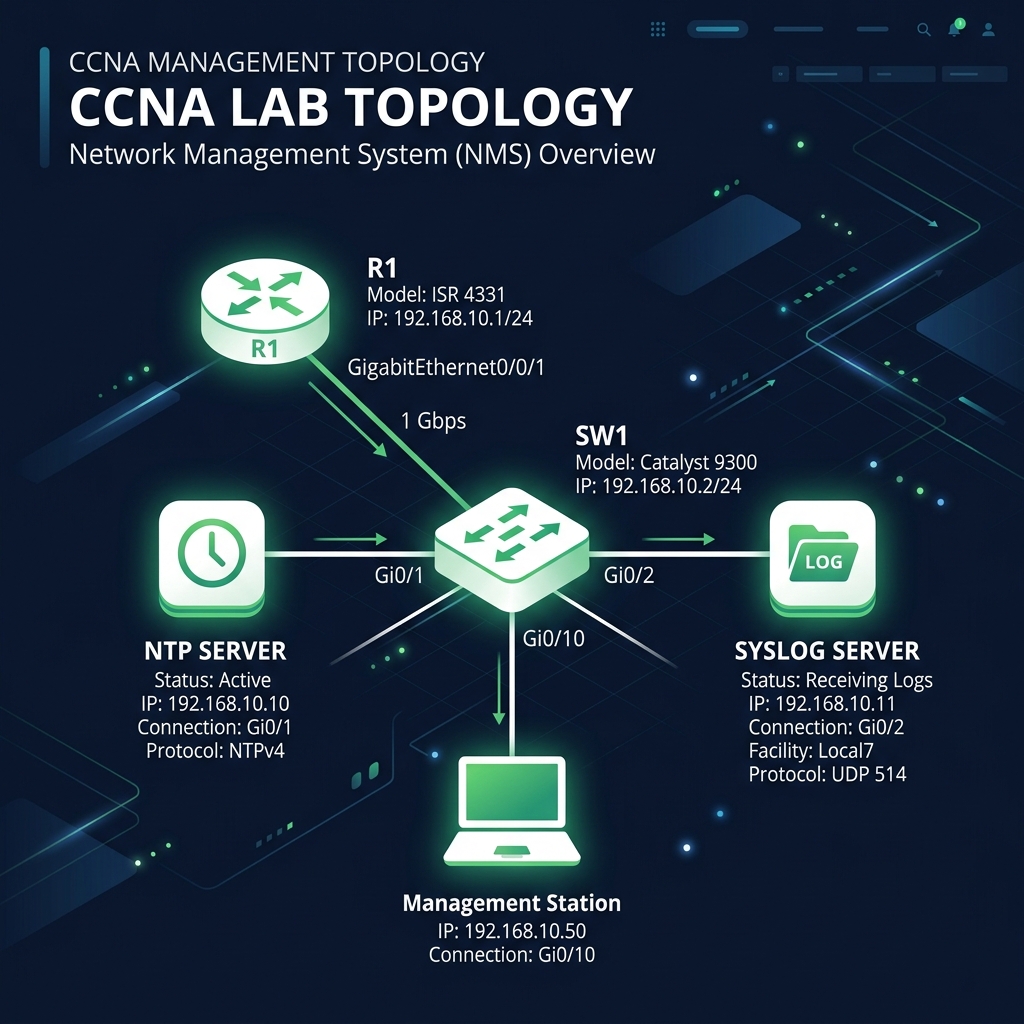
Task 1 - Configure NTP Client Synchronization
Sync R1's clock with the NTP Server at IP address 192.168.1.100.
R1(config)# ntp server 192.168.1.100
Task 2 - Configure Syslog Centralized Logging
Forward all logs on R1 to the Syslog Server at IP address 192.168.1.150. Set the severity filter to level 5 (Notifications) and above.
R1(config)# logging host 192.168.1.150
R1(config)# logging trap notifications
Task 3 - Configure High-Precision Timestamps
Configure log messages to display high-precision datetime stamps with millisecond details.
R1(config)# service timestamps log datetime msec
Task 4 - Verification
Check NTP synchronization status and review the system clock settings.
R1# show ntp status
Clock is synchronized, stratum 3, reference is 192.168.1.100
nominal frequency is 250.0000 Hz, actual is 250.0000 Hz, precision is 2**18
reference time is E23A1B2C.4D03F1E2 (18:15:30.450 UTC Sat May 23 2026)
clock offset is 0.0000 msec, root delay is 4.25 msec
root dispersion is 1.15 msec, peer dispersion is 0.12 msec

R1# show ntp associations

      address         ref clock     st  when  poll reach  delay  offset    disp
*~192.168.1.100    127.127.1.1      2    15    64  377     4.2    0.00     0.1
 * master (synced), # master (unsynced), + selected, - candidate, ~ configured