Objective
In this advanced lab, you will build a multi-router topology from scratch. You will configure basic security, establish IP connectivity, and use OSPF Area 0 for dynamic routing. Finally, you will implement a Standard Named ACL on the core router to control access to the central server.
Lab Topology
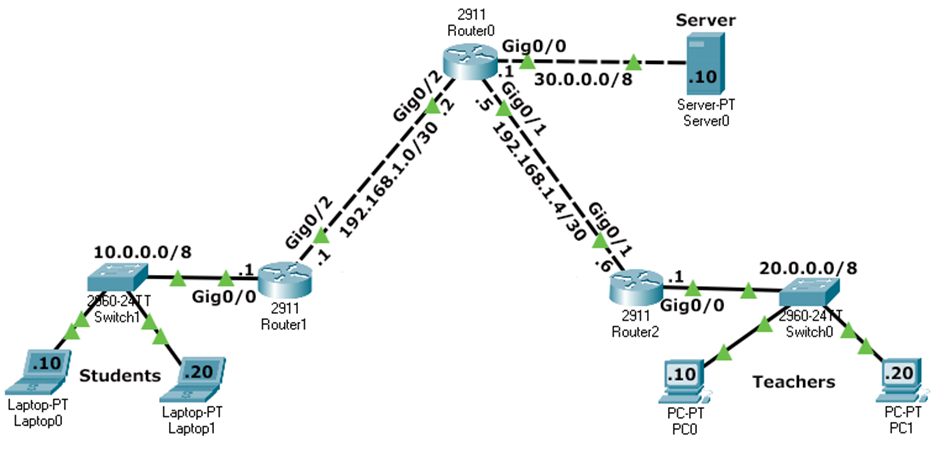
| Network | Subnet | Default Gateway | Router Interface |
|---|---|---|---|
| Students | 10.0.0.0/8 |
10.0.0.1 |
Router1 Gi0/0 |
| Teachers | 20.0.0.0/8 |
20.0.0.1 |
Router2 Gi0/0 |
| Server | 30.0.0.0/8 |
30.0.0.1 |
Router0 Gi0/0 |
| Link R0-R1 | 192.168.1.0/30 |
- | R1 Gi0/2 (.1) / R0 Gi0/2 (.2) |
| Link R0-R2 | 192.168.1.4/30 |
- | R0 Gi0/1 (.5) / R2 Gi0/0 (.6) |
Task 1 - Basic Device Configuration
Configure hostname, security, and banners on Router0, Router1, and Router2.
Router(config)# hostname RouterX
RouterX(config)# no ip domain-lookup
RouterX(config)# banner motd # Authorized Access Only #
Task 2 - Interface IP Addressing
Bring up the interfaces and assign IPs according to the topology table.
Router0 - Interface Config
Router0(config)# interface gigabitethernet 0/0
Router0(config-if)# ip address 30.0.0.1 255.0.0.0
Router0(config-if)# no shutdown
Router0(config-if)# exit
Router0(config)# interface gigabitethernet 0/1
Router0(config-if)# ip address 192.168.1.5 255.255.255.252
Router0(config-if)# no shutdown
Router0(config-if)# exit
Router0(config)# interface gigabitethernet 0/2
Router0(config-if)# ip address 192.168.1.2 255.255.255.252
Router0(config-if)# no shutdown
Task 3 - Dynamic Routing (OSPF Area 0)
Enable OSPF Process 1 on all three routers to ensure the network is fully reachable.
Router0 - OSPF Settings
Router0(config)# router ospf 1
Router0(config-router)# router-id 0.0.0.0
Router0(config-router)# network 30.0.0.0 0.255.255.255 area 0
Router0(config-router)# network 192.168.1.0 0.0.0.3 area 0
Router0(config-router)# network 192.168.1.4 0.0.0.3 area 0
show ip route to confirm all networks (10.x, 20.x, 30.x) are
learned via OSPF (marked with 'O').
Task 4 - Implementing Standard Named ACL
- Case Sensitivity: Names like
BlockStudentsandblockstudentsare seen as two different lists. - No Spaces: Use CamelCase or underscores (e.g.,
DENY_SALES). - Easy Editing: Named ACLs allow you to insert or remove specific rules using sequence numbers without deleting the entire list.
- Placement: Since this is aStandard ACL, we apply it on the interface closest to the destination (Router0) to avoid blocking intended traffic elsewhere.
Create the BlockStudents ACL on Router0 and apply it outbound on the interface
facing the Server.
Router0(config)# ip access-list standard BlockStudents
Router0(config-std-nacl)# deny 10.0.0.0 0.255.255.255
Router0(config-std-nacl)# permit any
Router0(config-std-nacl)# exit
Router0(config)# interface gigabitethernet 0/0
Router0(config-if)# ip access-group BlockStudents out
Task 5 - Verification Commands
Check the ACL status and match counters on Router0.
Router0# show ip access-lists
Standard IP access list BlockStudents
    10 deny  10.0.0.0 0.255.255.255 (24 matches)
    20 permit any (12 matches)

Router0# show ip interface gigabitethernet 0/0
...
  Outgoing access list is BlockStudents
  Inbound  access list is not set
...
Task 6 - Connectivity Verification (Ping Results)
The following table summarizes the expected ping results after the ACL is active.
| Source Device | Destination IP | Expected Result | Reason |
|---|---|---|---|
| Student PC1 | Server (30.0.0.10) | FAILED | Blocked by ACL (10.0.0.0/8 source) |
| Student PC1 | Teacher PC1 (20.0.0.10) | SUCCESS | ACL only applied outbound to Server interface |
| Teacher PC1 | Server (30.0.0.10) | SUCCESS | Permitted by 'permit any' in ACL |
| Teacher PC1 | Student PC1 (10.0.0.10) | SUCCESS | No ACL blocking this path |
| Server | Teacher PC1 (20.0.0.10) | SUCCESS | Reachability via OSPF |
Task 7 - Deleting the Security Policy
If you need to remove the ACL, always remove it from the interface first.
Router0(config)# interface gigabitEthernet 0/0
Router0(config-if)# no ip access-group BlockStudents out
Router0(config-if)# exit
Router0(config)# no ip access-list standard BlockStudents